Biggest Motorola Razr Ultra 2025 Buying Mistakes (And How to Avoid Them)
The Motorola Razr Ultra 2025 is one of the headline foldable phones of its generation: a clamshell foldable that promises pocketable convenience, large-screen multitasking, and a distinctive design that stands out from slab-style phones. For many buyers, the Razr Ultra delivers an appealing mix of style and capability. Yet the foldable category brings specific trade-offs and pitfalls that often catch new owners off guard. This article outlines the most common buying mistakes people make when considering the Razr Ultra 2025 and shows how to avoid them, backed by practical, real-world considerations catering to everyday users, commuters, photographers, and productivity-oriented buyers.
Introduction: Why many buyers get surprised
Foldables like the Motorola Razr Ultra 2025 change long-standing expectations about what a phone can be. The convenience of a compact device that unfolds to a large display creates new use cases — but also new compromises. Buyers frequently focus only on headline specs, marketing images, or the novelty factor. In practice, experience with a foldable depends heavily on usage patterns, expectations around durability and software maturity, and attention to accessories and service options. Understanding those trade-offs before purchasing makes the difference between satisfaction and buyer's regret.
Common Buying Mistakes (and how to avoid them)
Mistake 1: Treating a foldable like an ordinary smartphone
Many buyers look at the Razr Ultra 2025 and assume it will behave the same as a traditional slab phone. In reality, foldables introduce additional mechanical components (the hinge), a different internal chassis layout, and two usable display surfaces (cover and main) that change app behavior and ergonomics. Ignoring these differences leads to frustration over gestures, case fit, or camera handling.
How to avoid it: Evaluate how the device will be used in daily life. If pocketability and quick one-handed tasks matter most, the Razr Ultra’s compact folded form is a genuine benefit. If maximum battery life, ruggedness for outdoor work, or extensive single-handed typing are priorities, compare alternatives. Test key workflows — unfolding for media, using the cover screen for notifications, and carrying the device in pockets or bags.
Mistake 2: Underestimating hinge and screen care
Hinge performance and the flexible display are the unique mechanical aspects of foldables. Buyers often assume the hardware is as indestructible as a traditional glass phone and skip considering protection and handling rituals. Small particles, rough treatment, or frequent bending at awkward angles can accelerate wear.
How to avoid it: Seek models with proven hinge engineering and transparent durability testing. Plan to use a protective case designed for the Razr Ultra and avoid storing the phone face-down with small debris. Read the warranty terms for hinge and screen coverage and consider manufacturer or carrier protection plans for peace of mind.
Mistake 3: Picking storage without thinking of long-term needs
Foldables typically emphasize sleek design over easy expansion. Many Razr Ultra configurations may not support microSD cards, and internal storage options can be limited. Buyers who choose the lowest-capacity model to save money often run into constraints after a year of photos, app growth, and offline media.
How to avoid it: Estimate two to three years of usage. If the buyer takes many high-resolution photos, records video for social media, or keeps large offline media libraries, opt for a larger internal-capacity configuration. Where cloud backups are acceptable, plan for reliable wireless backups and off-device storage to reduce local growth pressure.
Mistake 4: Ignoring battery-life trade-offs
Foldables pack two displays and a compact body, so they rarely match the battery endurance of similarly specced slab phones. Buyers who assume the Razr Ultra will deliver "all-day" battery under heavy use — high-brightness media, prolonged gaming, or extended camera sessions — may be disappointed.
How to avoid it: Check independent battery-life reviews that reflect real-world scenarios, not just manufacturer claims. Consider usage patterns (e.g., frequent streaming or navigation) and plan for a midday charge if needed. Carrying a small power bank or choosing a charging strategy that takes advantage of faster wired or wireless charging can keep the device usable through heavy days.
Mistake 5: Overvaluing novelty camera specs without testing
Marketing highlights flexible camera setups or large sensors, but camera systems on foldables must fit within a thinner chassis and often use compromises to keep hinge and thickness reasonable. Buyers who select the Razr Ultra solely for headline megapixel counts or sensor sizes might find low-light performance or telephoto consistency less impressive than on larger slab phones.
How to avoid it: Look at sample images and independent camera comparisons across lighting conditions relevant to the buyer’s life — low light, indoor portraits, and daylight telephoto. For social-media users, prioritize consistent color and skin tones; for photography enthusiasts, prioritize manual controls and RAW support if present.
Discover deals on Mobile Phones — updated daily.
Shop Amazon →Mistake 6: Not verifying carrier or band compatibility
Some international variants differ in modem hardware, supported 5G bands, or carrier-specific features. Buyers who import a Razr Ultra or pick a variant without checking compatibility can encounter limited network performance, missing VoLTE support, or inability to use local carriers effectively.
How to avoid it: Confirm the exact model number and supported cellular bands with the carrier before purchase, especially for users in regions with specific mid-band 5G deployments. Verify VoLTE and Wi‑Fi calling support if these matter for coverage indoors.
Mistake 7: Assuming software behavior equals other Android phones
Motorola’s software customization and how apps adapt to the cover/main screen can differ from other Android OEMs. Buyers expecting identical app continuity, multitasking gestures, or update cadence may find differences in feature availability and update speed.
How to avoid it: Review the manufacturer’s software update policy and check how popular apps behave on the Razr Ultra’s cover screen and when transitioning across displays. If timely Android upgrades and security patches are a priority, factor manufacturer and carrier update commitments into the buying decision.
Mistake 8: Skipping hands-on testing for ergonomics and use cases
Spec sheets do not capture the feel of a phone in hand, how the crease appears to an individual’s eye, or whether one-handed typing and camera balance are comfortable. Buyers who purchase sight unseen risk surprises about pocket fit, hinge feedback, or the usability of the cover screen for quick tasks.
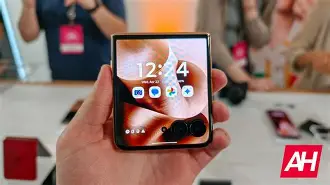
How to avoid it: Spend time in a store or with a demo unit to perform typical tasks — typing a message folded, opening the phone for a video call, using the external screen for payments, and trying camera grip angles. If the device cannot be tested locally, seek long-form video reviews that show sustained real-world usage rather than short unboxings.
Detailed Product Review and Practical Analysis
The Motorola Razr Ultra 2025 positions itself as a premium clamshell foldable, balancing fashion and function. The design language emphasizes a slim folded footprint and a larger internal display when opened. From a practical standpoint, the Razr Ultra appeals to users who prioritize pocketability without sacrificing a big-screen experience for streaming and multitasking. The external cover screen is a focal point of the user experience: when well-implemented, it reduces the need to unfold the phone for quick tasks like replying to messages, checking navigation directions, or controlling music.
Build and hinge: Motorola’s hinge engineering has historically been a differentiator. For the 2025 model, the hinge aims to fold smoothly while minimizing visible crease and maintaining structural rigidity. Real-world use shows that hinge feel and resistance matter: a hinge that’s too stiff makes frequent unfolding cumbersome, while one that’s too loose undermines the sense of premium build. Buyers should assess hinge stiffness and listen for any unwanted rattles during demo sessions.
Displays: The internal main display should offer a large, immersive canvas for video and multitasking, with a high refresh rate to keep scrolling and animations fluid. The cover display’s size and functionality define how often the device is used without opening. A thoughtfully designed cover screen supports quick replies, widgets, and camera framing. For users who only ever glance at notifications, a minimal cover screen may be sufficient; power users will prefer a larger, more capable external panel.
Performance and software: The Razr Ultra typically uses a high-end mobile chipset intended to handle gaming and productivity, but sustained performance on a compact foldable depends on thermal management and software optimization. In practice, motorola’s near‑stock Android approach favors a clean interface and useful gestures, but buyers should verify multitasking support and how apps adapt to split-screen or multi-window setups.
Camera and media: The camera system is designed to be competitive for everyday photography, with particular emphasis on quick snapshots and convenient folding-enabled camera modes (like using the cover screen as a viewfinder). For buyers who prioritize advanced photography — dedicated telephoto quality or professional-level low-light shooting — a comparison against flagship slabs is prudent.
Battery life and charging: Given the physical constraints of a foldable clamshell, battery capacity tends to be modest versus large-slab phones. In daily use, battery life will vary significantly with display usage (cover screen activity vs. open-screen media). Fast charging and wireless charging are practical features: buyers should check real-world charging times when planning all-day use.
Find top-rated Mobile Phones products at great prices.
Browse Now →Repairability and service: Repair costs on foldables can be higher than on traditional phones, especially when the internal flexible display or hinge requires attention. Consider the availability of authorized repair centers and the details of manufacturer warranty coverage for foldable-specific components.
Pros & Cons
- Pros
- Exceptional pocketability when folded, without giving up a large internal display.
- Large external cover screen for quick interactions and camera framing.
- Unique design language and style appeal for users who value form as much as function.
- Generally strong day-to-day performance for productivity and media.
- Cons
- Battery endurance may lag behind similarly specced slab phones under heavy use.
- Repair and replacement costs can be higher due to foldable-specific components.
- Potential software quirks when switching between cover and main displays.
- Limited options for storage expansion on many variants.
How the Razr Ultra 2025 Compares (Quick reference)
| Model | Form factor | Cover screen | Hinge & durability | Battery life (typical) | Camera suitability | Best for | Price tier |
|---|---|---|---|---|---|---|---|
| Motorola Razr Ultra 2025 | Clamshell foldable (compact folded) | Large, functional cover display for notifications and quick tasks | Refined hinge, tested for repeated folds; still needs careful handling | Moderate — optimized for everyday use, less for marathon sessions | Good for quick snaps and social media; very capable in daylight | Style-focused users, commuters, one-handed quick access | Premium |
| Competitor A (typical clamshell) | Clamshell foldable | Varies — sometimes smaller or less capable | Similar hinge engineering; quality varies by maker | Comparable or slightly better/worse depending on battery size | Similar daytime performance; low-light varies | Users who prioritize compactness | Premium |
| Large-slab flagship | Standard slab | Not applicable | Very durable glass and aluminum frames | Often better battery life for heavy use | Usually stronger telephoto and low-light performance | Photography enthusiasts and power users | Premium to ultra-premium |
Buying Guide: Practical checklist before purchasing
1. Match the Razr Ultra to the buyer’s daily routines
Identify the primary use cases: commuting with frequent one-handed use, heavy media consumption, photography, or productivity. The Razr Ultra excels at quick access and portability; if continuous heavy-screen time is the norm, budget for charging strategies or consider a larger-slab alternative.
2. Inspect hinge feel and fold quality in person
Spend time folding and unfolding a demo unit. Look for smooth motion, consistent resistance, and no rattles. Observe how visible the crease is on the main display and whether that impacts activities like reading or watching video.
3. Choose storage for future needs
Unless comfortable relying on cloud storage, upgrade internal capacity to avoid long-term frustration. Consider how many apps, photos, and offline media the buyer typically keeps, and pick a configuration with room to grow.
4. Verify warranty, repair options, and protection plans
Foldables have specialized components; confirm what the standard warranty covers and whether optional protection plans include screen and hinge damage. Check availability of local authorized repair centers and typical repair turnaround times.
5. Assess camera performance for the intended use
Look at photo samples that mirror the buyer’s habits — portrait photos, low-light interiors, night scenes, and video stabilization. If the device will be the primary camera for family or travel, prioritize consistent overall results over marketing specs.
6. Confirm carrier compatibility and unlocked models
If buying an unlocked variant or importing, verify network band support and carrier feature compatibility in the buyer’s country. Confirm that VoLTE and Wi-Fi calling function with the intended carrier where coverage is poor.
7. Plan accessory and case purchases
Select a case specifically made for the Razr Ultra’s hinge and dimensions. Consider a screen protector designed for flexible displays if the manufacturer or an authorized partner offers one. Accessories like compact power banks and wireless chargers are practical for heavy users.
8. Time purchases around software updates and price cycles
New foldable models sometimes receive significant software updates in the months after launch that improve stability and camera processing. If the buyer is price-sensitive, waiting for early promotional cycles or trade-in windows can reduce cost without sacrificing long-term value.
Conclusion
The Motorola Razr Ultra 2025 can be a compelling choice for buyers who value pocketability, a modern design, and the convenience of a capable external display. However, the unique nature of foldables requires a considered approach: treat the Razr Ultra as a different category of device rather than a direct replacement for a slab phone. Avoid common mistakes by testing ergonomics and hinge quality, choosing adequate storage, checking carrier compatibility, and planning for battery realities and protection needs. When choices align with real-world usage and long-term expectations, the Razr Ultra rewards owners with a distinctive, practical smartphone experience that fits modern mobile lifestyles.